
Troubleshooting autoref (i-Optik)

Required information

To resolve your autoref issue as quickly as possible, please make sure you have the following two pieces of information ready.

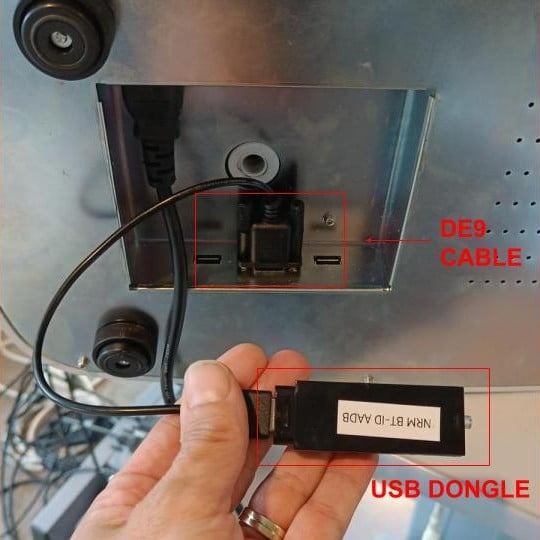
Correct dongle connection setup​

A single connection setup is supported :

  • a DE9 cable connected to the autoref
  •  a USB dongle on the other end

You can find those informations UNDER the autoref, please lay it carrefuly on the side to have access. 
On the dongle you should see a green light:

  • Fixed Greenlight = Paired with SiVIEW Box
  • Blinking Greenlight = Waiting for pairing


If the dongle is not connected as shown in the picture, no data transfer will work.

The USB ​dongle should NOT be connected directly to the autoref.
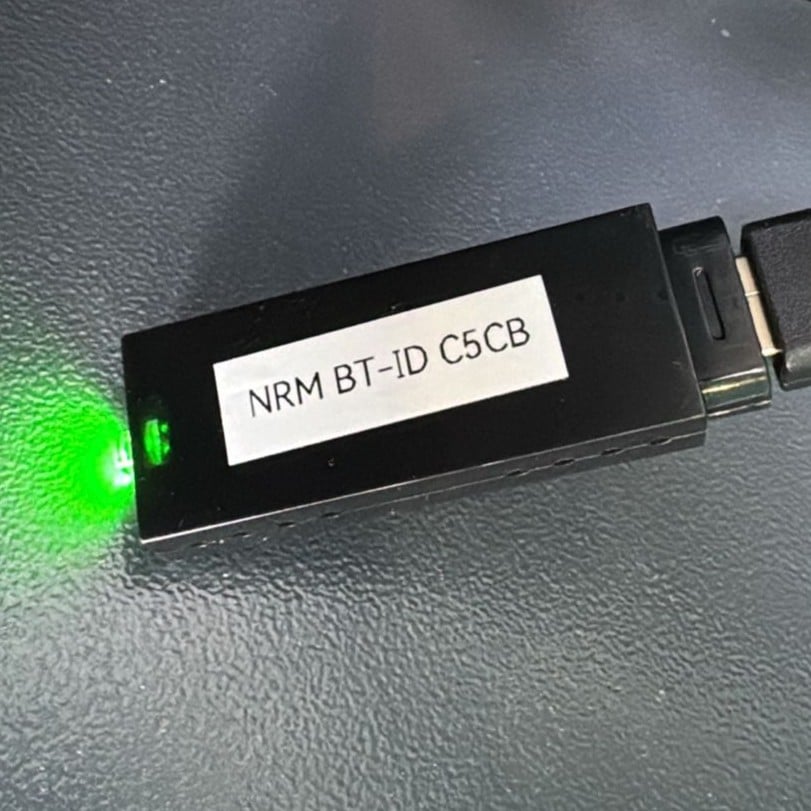
Send photos

  • Take clear photo of this side of the USB dongle and send it to us so we can help you faster.

Is your problem still unresolved?

Contact our Technical Support

Fill in our customer support form
or contact our specialists.